Why RCS for Business Threads Never Show a Lock Icon
The lock that appeared in May 2026 is person-to-person RCS. RCS for Business is point-to-point, scanned by Google, and never shows a lock. Two products. One inbox.
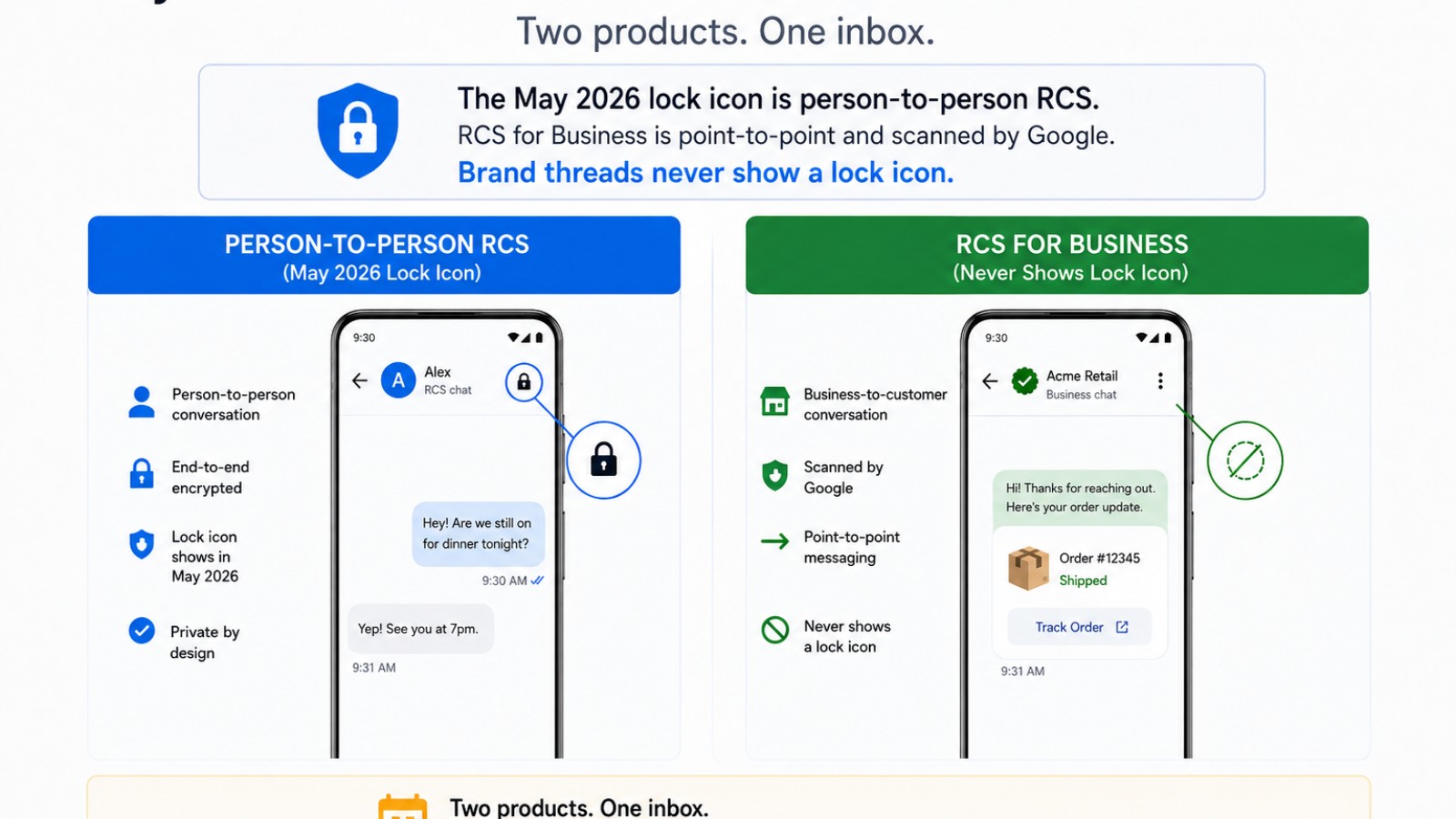
Someone put a lock on the slide. The phone in the customer's hand does not show one.
In May 2026, iPhone users on iOS 26.5 started seeing a lock icon in some RCS chats. A vendor deck, an RFP, and a security questionnaire copied it onto RCS for Business. That is two products. The lock is person-to-person RCS. A brand thread is not.
The lock people saw is person-to-person RCS
On 11 May 2026, Apple's Newsroom said iPhone users on iOS 26.5 begin seeing a new lock icon in RCS chats indicating messages are end-to-end encrypted. The rollout is a beta with supported carriers and Android users on the latest Google Messages. When those RCS messages are end-to-end encrypted, they cannot be read while they are sent between devices. Encryption is on by default and will be automatically enabled over time for new and existing RCS conversations. iMessage has always been end-to-end encrypted and remains the best way to communicate between Apple devices.
Google's Android blog posted the same day, on the same product. Google Messages users see the same lock icon previously used in RCS chats. Android-to-Android already had end-to-end encryption, on devices that support the RCS standard and have it enabled.
RCS versus SMS is the channel comparison. The lock is a consumer chat feature, not a trust badge for a brand agent.
RCS is live on all US carriers and on iOS and Android. That is channel availability, not a customer claim, and not a promise that every device gets a rich card. Do not treat a named carrier as a customer. Do not say everyone has RCS.
Apple already split the controls
Apple's RCS on iPhone page, published 11 May 2026, keeps the products apart. RCS is carrier-provided. It needs iOS 18 and a carrier that supports RCS on iPhone. When it is on, person-to-person RCS can carry delivery receipts, read receipts, and typing indicators in green bubbles.
RCS Business Messages is a separate control under Settings, Apps, Messages, RCS Messaging. Apple says some businesses can send alerts and updates on orders and other transactions. You can turn these off. Report Junk exists. End-to-End Encryption (Beta) is a third control, on by default in iOS 26.5, on supported carriers, rolling out over time. That toggle is the lock. It is not the business toggle.
What RCS for Business is is the operator page. Apple 122195 is the citation for the iPhone split. Google's FAQ splits RCS from RCS for Business the same way. The iPhone versus Android post is the client split. This post is the encryption split.
Business RCS is point-to-point. There is no lock.
Google's data security page is the explicit no. RBM does not offer end-to-end encryption. That is why you will not see a lock icon displayed within the Messages UI for RBM conversations. RBM uses point-to-point encryption between user devices and Google's servers, and between Google's servers and messaging partners.
Businesses cannot control the encryption keys. Google manages them so it can scan for phishing, malware, and Acceptable Use Policy violations. Google may scan business-to-user content for AUP, spam, and Safe Browsing. Partners, businesses, and carriers have access to RBM message content for delivery and other purposes. Google has access to apply spam and abuse protections, and does not have access to user-to-business message contents except when the user reports spam.
Google's how it works guide says partners cannot use their own encryption keys because Google needs to scan messages for malicious content to protect all users and businesses.
See security. It is not an independent certification. Do not paste Google's ISO 27001, SOC 2, or SOC 3 language onto MessageOS. Those statements are about Google's RCS infrastructure. The RBM rename did not change this. The public name is RCS for Business. The API still says RBM.
HIPAA is a no. Healthcare is not banned.
Google's data security page is also the HIPAA no. RBM is not compliant with HIPAA. Healthcare use cases are allowed only if PHI is excluded. Google's own examples are an appointment reminder, or a notification with a link to log in to a secure patient portal. PHI in the thread is prohibited.
That is the healthcare pattern and the RCS for healthcare operator page. A clinic can send the reminder. The person can tap into the portal. The thread is not a health record, and it is not end-to-end encrypted. Legal is the same split. Intake can live in the thread. Do not pretend the thread is end-to-end encrypted so you can claim privileged work lives there.
The trust signal is the verified sender, not a lock
When the thread opens in native Messages, that is the power of an app with the reach of a text message. Operators care about a verified sender, read receipts, delivery receipts, typing indicators, rich cards, and suggested actions. Google's brand verification guide is the citation for that checkmark. Google's events guide is the citation for receipts as platform events.
Never put a lock on a business thread as a trust signal. The checkmark is. If a vendor deck, an RFP, or a security questionnaire treats the May 2026 lock as a business-messaging feature, it is mixing two products.
One launched agent, every door, no lock
RCS for Business still has to be launched. What live on a carrier means is that gate. Brands reach the channel through a partner. MessageOS.ai is an Official Google RBM Partner. We are not Google, and we are not the carrier. Google's first step is choosing a partner. How brands get live with a partner is that path.
MessageOS can set up Search, Maps, ads, a Google Business Profile proof of concept, a QR, sms deep links, a missed call text back, a website share-row icon, and the rest of the entry points map. They land in one thread. Click to Message is one tap. The operator guide is the longer version. Click-to-RCS on a Business Profile is a controlled proof of concept. It is not a DIY toggle.
An HVAC Saturday no-cool, a home services window, a retail pickup, live commerce in Messages, or a local business booking all need that launched agent. Live RCS is the launched thread. Agencies can put the same agent behind the work they already run. The agencies page is the partner door. A dental office, a restaurant, or an auto shop is the same pattern. The Learn guides walk those verticals.
What to do next
If the RFP treats the May 2026 lock as a business-messaging feature, take it off the slide. Person-to-person RCS can show a lock. RCS for Business never does. Point-to-point. Scanned. No lock.
Open See Your Brand in Messages if you want the public door. If you want that door on your own brand, contact us or get in touch. An evaluation is available. Bring the questionnaire and the outcome you want from the first tap.
The lock people saw is not the brand. The conversation is.
- What Is RCS Business Messaging?RCS Business Messaging (RBM) is a messaging standard that replaces plain SMS with branded, verified, interactive conversations in the phone's native messaging app. A business is verified with carriers and platform providers, then sends and receives rich content: logo and brand name, rich cards, carousels, suggested replies, images, and real two-way dialogue. Availability depends on the recipient's carrier, device, and operating system, and messages fall back to SMS when RCS is unavailable.
- RCS for Healthcare: Access, Reminders, and Patient CommunicationIn healthcare, RCS Business Messaging is used for appointment scheduling and reminders, pre-visit instructions, wayfinding, refill and follow-up nudges, and directing patients into secure portals for anything containing protected health information. Verified sender identity helps patients distinguish real outreach from phishing. Any deployment must be scoped by your privacy and compliance program, including HIPAA in the United States, and sensitive detail generally belongs behind an authenticated webview rather than in the thread.
- Click to Message: Turning a Tap Into a ConversationClick to Message is an entry point that opens the phone's native messaging app with a conversation already addressed, and usually pre-filled, so the customer only has to press send. It can be placed on a website, a search result, an ad, a QR code, an email, a social profile, or a physical sign. It works because the customer stays in an app they already trust instead of loading a new page or filling in a form.
Primary sources worth reading
- RCS Business Messaging developer documentation· Google for Developers
Google's technical reference for RCS Business Messaging: agent registration, rich cards and carousels, suggested replies and actions, capability checks, and webhook events.
Sources and further learning
- Data security for RCS for Business· official documentation
Google's explicit no on E2EE for RBM, point-to-point encryption, no lock icon, HIPAA no, PHI exclusion.
- End-to-end encrypted RCS messaging begins rolling out today in beta· article
Apple 11 May 2026 Newsroom on P2P RCS E2EE beta, lock icon, iOS 26.5, supported carriers.
MessageOS Team
· MessageOS.aiMessageOS is the Conversation-to-Outcome Platform, helping brands turn Google Search, AI Search, and click-to-message intent into branded AI conversations that deliver measurable outcomes.