Google Business Profile Chat is still WhatsApp or SMS
Google's own Chat field on a Business Profile is WhatsApp or SMS. Branded RCS on a listing is a partner launch, not a DIY toggle. MessageOS launches the verified agent and Click to Message.
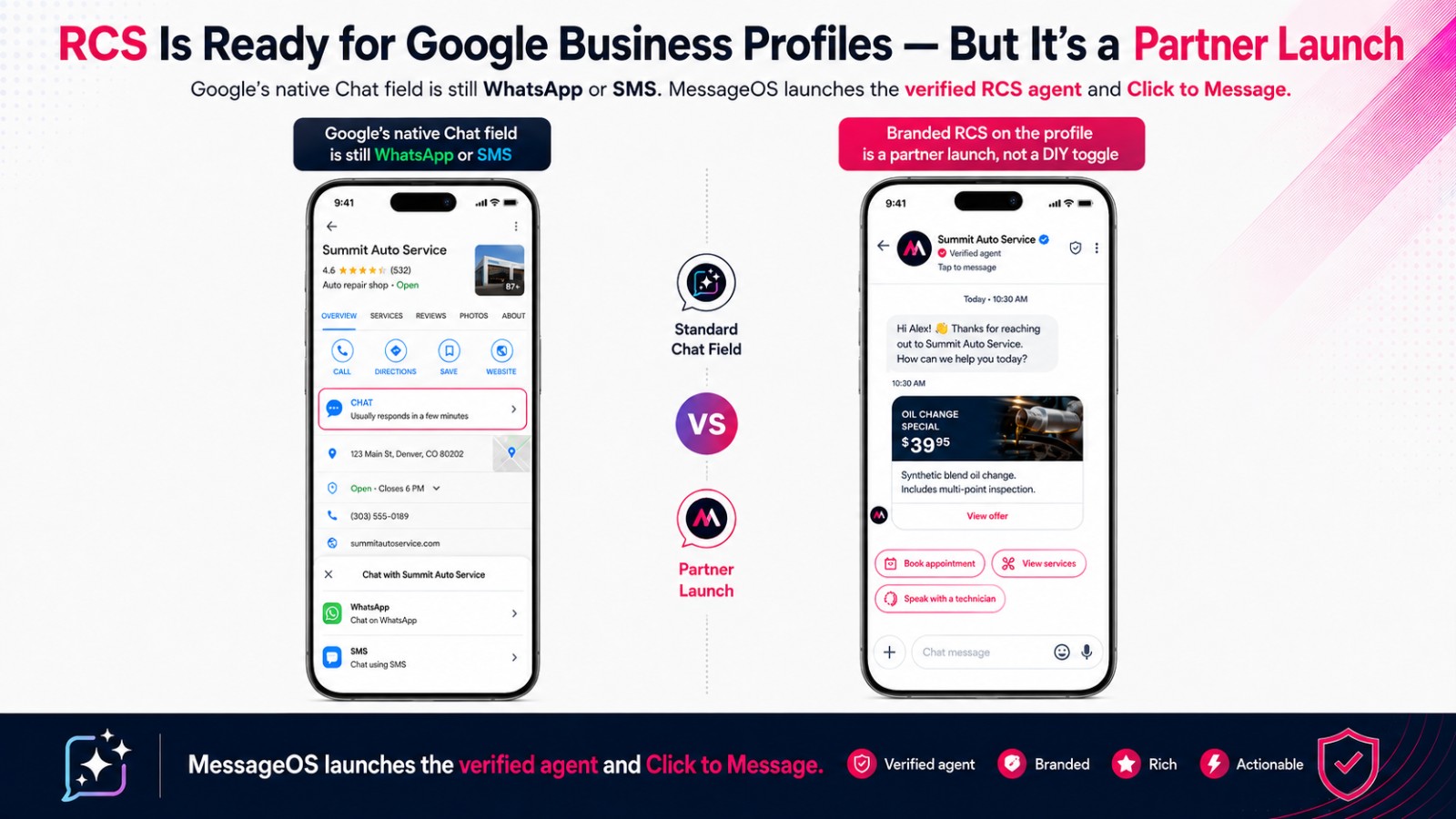
Google's own Chat field on a Business Profile is WhatsApp or SMS. That is a contact method. It is not branded RCS.
Operators keep mixing those two up. They open Edit profile, Contact, Chat, attach a WhatsApp URL or a textable number, and expect a verified sender in Messages. Google never promised that. The public field is a contact option for claimed, verified listings in select regions. Branded RCS on a listing is a partner launch, not a DIY toggle. MessageOS is an Official Google RBM Partner. We launch the verified agent and Click to Message. The Click to Message operator guide is the longer version of that tap.
What Google actually puts in Chat
Google Business Profile Help is the source of truth. Businesses with a claimed and verified Business Profile can add a WhatsApp or text messaging option to contact info. Chat options are currently available for select regions and might not be available for your profile. If you add both options, only the text message option is shown to customers. Different profiles can use the same WhatsApp link.
That is the product. A customer on mobile taps Chat and lands in WhatsApp or a plain text thread. There is no verified logo, no rich card, and no branded name at the top of Messages. RCS versus WhatsApp Business is the operator split if you are choosing an inbox, not a listing checkbox. WhatsApp still wins when the customer already lives there. The Chat field is how Google currently exposes that option on a profile.
A lot of Local SEO walkthroughs stop at Save. If Chat is missing, you are likely outside the select regions, or the listing is not fully claimed and verified. Finish verification. Keep the listing accurate. Then be honest about what the button will open.
Do not paste a WhatsApp URL into Chat and expect a checkmark in Messages.
What that tap is not
Click to Message is a tap that opens the phone's native messaging app, usually with the conversation already addressed. Google's public Chat field is not that product. It is still WhatsApp or SMS.
RCS is the carrier protocol. What RCS Business Messaging is is the business layer: a verified sender, rich cards, suggested actions, and a two-way thread in Messages. RCS versus SMS is the honest channel comparison, including where SMS still wins. The Chat field is the SMS side of that comparison, or a WhatsApp exit. It is not the RCS side.
RCS is live on all US carriers and on iOS and Android. That is channel availability. It is not a claim that every device will render a rich card. The phone still needs RCS on. The agent still has to be launched.
Search and Maps can open a user-initiated RCS thread on an Early Access path. That is a different door from the Chat field. Search and Maps can open RCS, GBP Chat still does not is that split. This post is the Chat field itself. If you need the public Chat steps, Add Click to Message on Google Business Profile is the listing how-to.
Branded RCS on a listing is a partner launch
You do not get a branded RCS button by flipping Chat. Google's RCS for Business overview is written for a verified name, logo, and two-way thread in the native Messages app. How a brand goes live is the MessageOS product page for that path. A brand does not self-serve the agent. How brands get live with a partner is the operator version.
Google's developer docs are blunt. To send messages through RCS for Business, you register with a partner. Partners create and manage agents on behalf of brands. Brand verification is required before the first launch. An authorized person at the brand confirms the partner has the right to run the agent. After launch, Messages can show a verified sender checkmark next to the sender name. None of that lives in Business Profile settings.
MessageOS is an Official Google RBM Partner. We create the agent, run brand verification, launch it, and wire Click to Message so the tap can land in that thread. Click to RCS on a Business Profile is a controlled proof of concept. Evaluations are available. It is not a settings toggle every listing can flip.
Do not start with a partner interest form unless you want to become a partner. Start with a partner that already is one.
After the tap, the inbox has to finish the job
A contact method is not an outcome. Search to Conversation is the motion after intent. A person searches, taps, and should land in a thread that can book, estimate, take intake, or start support.
Entry points is the map: Search, Maps, ads, the Business Profile proof of concept, a QR, a website, a missed-call text-back. They should land in one thread. That is the job of a conversation operating system.
A restaurant guest is asking if you can take four at 7. A home services shop is getting a photo of a leak. A law firm is getting someone who will not leave a voicemail. A retailer is getting a shopper who already decided. If the thread sits, they tap the next pin.
Local businesses already paid for the listing. Agencies already buy the search. Home services, legal, healthcare, and retail are the same pattern. The listing did its job. The conversation has to.
Inside a launched MessageOS thread, a Branded AI Concierge greets in your voice. Outcome Connectors pass the booking, the ticket, or the lead into the system you already run. Live Business Mode is the difference between a canned reply and a thread that knows hours, service area, and what you can do tonight. That work sits behind the button. It is not the Chat dropdown.
Two products, one listing
Keep the comparison pages next to this post. RCS vs WhatsApp Business is which inbox owns the tap. The blog version is the longer US operator split. RCS vs SMS is what actually changes inside Messages. Google's Chat field sits on the WhatsApp or SMS side of both pages. Partner-launched RCS sits on the other side.
If Chat already exists on your profile as WhatsApp or text, leave it until we tell you otherwise. Turning it off does not get you a branded button. MessageOS.ai is not a WhatsApp product, and it is not affiliated with messageos.io.
Named brand experiences on the MessageOS site are unofficial conceptual simulations. They are not customers.
What to do next
If your team is hunting for a Chat toggle that grows a verified RCS thread, stop. Google's own field will not do that.
Decide the outcome you want from the first tap. Book. Estimate. Order. Intake. Support.
Then message MessageOS. Bring the brand, the listing, and that outcome. We will tell you whether the profile can enter the click-to-RCS proof of concept, launch the verified agent, and put Click to Message behind the tap so the person who found you can finish the job in Messages.
- RCS vs SMS: What Actually Changes for a BusinessSMS is a universal, plain-text channel with no sender branding and a 160-character frame. RCS adds verified brand identity, rich cards, carousels, suggested replies, richer media, and true two-way conversation, but only where the carrier, device, and OS support it. Most brands run both: RCS where available, SMS as the automatic fallback.
- Click to Message: Turning a Tap Into a ConversationClick to Message is an entry point that opens the phone's native messaging app with a conversation already addressed, and usually pre-filled, so the customer only has to press send. It can be placed on a website, a search result, an ad, a QR code, an email, a social profile, or a physical sign. It works because the customer stays in an app they already trust instead of loading a new page or filling in a form.
- What Is RCS Business Messaging?RCS Business Messaging (RBM) is a messaging standard that replaces plain SMS with branded, verified, interactive conversations in the phone's native messaging app. A business is verified with carriers and platform providers, then sends and receives rich content: logo and brand name, rich cards, carousels, suggested replies, images, and real two-way dialogue. Availability depends on the recipient's carrier, device, and operating system, and messages fall back to SMS when RCS is unavailable.
Primary sources worth reading
- Google Business Profile Help· Google
Official documentation for Business Profile features, including the messaging and call to action surfaces on local listings.
- RCS for Business blog· Google
Google's official program blog for RCS Business Messaging, covering feature releases, brand case studies, and carrier rollout news.
Sources and further learning
- Chat with customers from your Business Profile· official documentation
Google's public Chat option on Business Profile. WhatsApp or text, select regions.
- RCS for Business· product resource
Google's overview of branded, verified conversations in the native messaging app.
MessageOS Team
· MessageOS.aiMessageOS is the Conversation-to-Outcome Platform, helping brands turn Google Search, AI Search, and click-to-message intent into branded AI conversations that deliver measurable outcomes.