RCS vs WhatsApp Business: Native Messages, Not Another App
WhatsApp needs another app. RCS opens in native Messages from Google Search. When each channel wins for US brands.
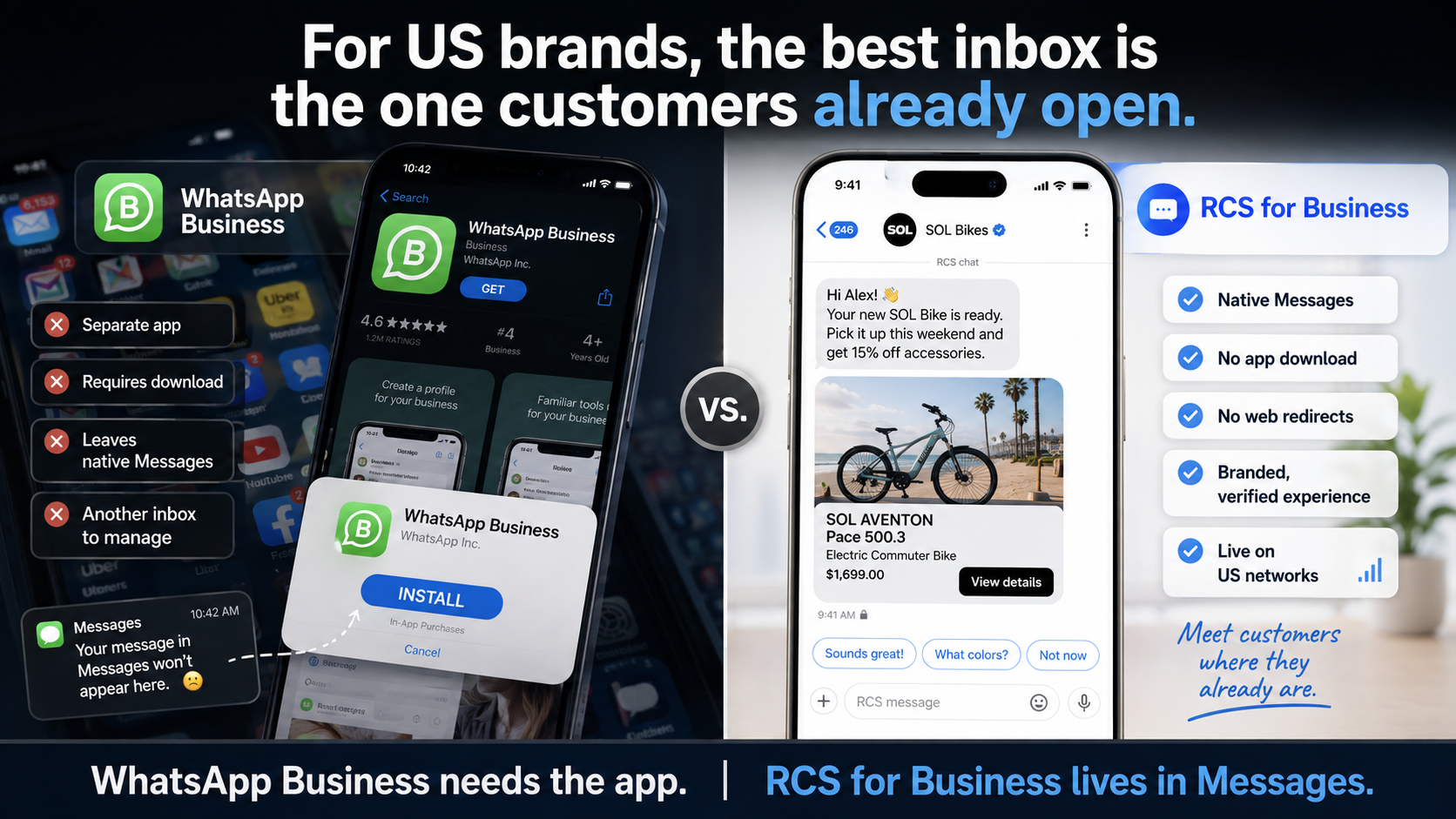
US operators keep getting the same question. Should the brand live in WhatsApp, or should it live in the inbox the customer already has? See the full comparison.
RCS for Business is the carrier-backed upgrade to SMS. A verified business runs branded, two-way conversations inside the phone's default messaging app. No extra app to download. WhatsApp Business is a real channel too. It is a separate app, with its own identity, its own inbox, and its own install requirement.
This is not a takedown. It is a US operator split. Pick the inbox the customer already opens, then be honest about where the other app still wins.
The short comparison
Where the thread lives. RCS opens in native Messages on Android and on iOS where RCS is on. WhatsApp opens only if the customer has WhatsApp installed and is willing to leave Messages.
Who the sender is. RCS can show a verified sender, a logo, and a brand name the carrier and Google have approved. WhatsApp can show a business profile inside WhatsApp. Those are not the same trust surface.
What the thread can do. RCS can carry the power of an app with the reach of a text message: read receipts, delivery receipts, typing indicators, rich cards, carousels, and suggested actions. WhatsApp can also be rich and two-way. The difference is not "rich versus plain." The difference is native inbox versus another app. Additonally, RCS can support marketing messages. WhatsApp has stoped supporting this use case.
How a customer starts. A Click to Message tap, a QR, an ad, a Search or Maps message button, or an sms deep link can open RCS in Messages. WhatsApp starts from a wa.me link, a QR, or a Chat field that already points at WhatsApp. Click to Message as an operator guide is the MessageOS version of that tap.
Reach in the United States. RCS is live on AT&T, Verizon, and T-Mobile, plus many of the regional carriers. Available on Android and iOS, as channel availability. That is not a promise that every device will render every rich card equally. SMS remains the fallback. WhatsApp reach in the US is the share of your customers who already keep that app. In many other countries that share is the default inbox. In the US it usually is not.
Where WhatsApp still wins
Use WhatsApp when the customer already lives there.
International buyers, travel guests, and campus or diaspora audiences often treat WhatsApp as the default text app. If your list is already opted into WhatsApp, and your team already runs that inbox, ripping it out to chase RCS is a waste. A home services shop with a US SMS list and a retail brand with a US search program are different problems from a tour operator whose guests already ping a WhatsApp number.
WhatsApp currently is a contact method on a Google Business Profile. Google's public Chat field on a listing still routes to WhatsApp or SMS. That is not branded RCS. Click to RCS on a profile is a controlled proof of concept through MessageOS, an Official Google RBM Partner. It is not a DIY toggle. We already wrote the listing version: Search and Maps can open RCS, GBP Chat still does not.
Do not paste a WhatsApp URL into Chat and expect a checkmark in Messages.
Where RCS changes the US motion
The US customer already has a messaging app. It is Messages. They already gave that inbox permission to interrupt them. RCS versus SMS is the honest channel comparison, including where SMS still wins. WhatsApp asks them to open a second app, find your business, and keep that thread alive next to family chats.
Search to Conversation is the MessageOS name for what happens after intent. A person searches, taps, and lands in a thread that can finish the job. That thread should look like the brand, not like an unknown 10-digit number and not like a third-party app they did not ask to install.
Google documents the building blocks on RCS for Business and in the rich cards guide. Those pages are about a verified business in native Messages. They are not a WhatsApp spec.
What any given brand can actually do in a thread still depends on carrier and device support, brand verification, the APIs your systems expose, and the rules for your industry. MessageOS is the conversation layer on top of those systems, not a replacement for them.
One agent, every US door
Do not stand up a WhatsApp bot for search, an SMS blast for reminders, and a web form for booking, then call it a stack. Entry points is the map: Search, Maps, ads, the Business Profile proof of concept, a QR, sms deep links, a missed-call text-back, a website icon. They should land in one thread.
That is the job of a conversation operating system. The customer does not care which vendor shipped the card. They care that the brand answered, showed the slot, and booked the job without a download.
RCS is not a replacement for SMS, it is a massive upgrade. Run both. RCS is the upgraded experience where the device and carrier support it. SMS is the fallback so nobody is dropped. Treating RCS as a WhatsApp clone that happens to live in Messages is the wrong frame. Treating it as the native inbox for US search, ads, and listings is the right one.
What to do next
If your customers already live in WhatsApp, keep WhatsApp. Do not let a US RCS brief talk you out of a working international inbox.
If your customers live in Messages, and you are paying for search, ads, or a listing so they can reach you, put the conversation in that inbox. Talk to MessageOS in Messages, or contact the team / request a preview. Bring the brand, the surfaces you already pay for, and the outcome you want from the first tap: book, order, intake, or a support start.
We will tell you which doors are RCS, which door is still WhatsApp or SMS, and which proof of concept we can run. Then the person who found you can finish the job without installing another app.
- What Is RCS Business Messaging?RCS Business Messaging (RBM) is a messaging standard that replaces plain SMS with branded, verified, interactive conversations in the phone's native messaging app. A business is verified with carriers and platform providers, then sends and receives rich content: logo and brand name, rich cards, carousels, suggested replies, images, and real two-way dialogue. Availability depends on the recipient's carrier, device, and operating system, and messages fall back to SMS when RCS is unavailable.
- Click to Message: Turning a Tap Into a ConversationClick to Message is an entry point that opens the phone's native messaging app with a conversation already addressed, and usually pre-filled, so the customer only has to press send. It can be placed on a website, a search result, an ad, a QR code, an email, a social profile, or a physical sign. It works because the customer stays in an app they already trust instead of loading a new page or filling in a form.
- RCS for Retail: How Brands Turn the Inbox Into a Storefront, a Loyalty Program, and a Service DeskRetail brands spend fortunes on email and SMS to fight for an inbox slot most shoppers ignore. RCS Business Messaging plus an AI agent gives retailers a verified, two-way, fully visual storefront inside the native messages app, where shoppers actually look.
Primary sources worth reading
- RCS Business Messaging developer documentation· Google for Developers
Google's technical reference for RCS Business Messaging: agent registration, rich cards and carousels, suggested replies and actions, capability checks, and webhook events.
Sources and further learning
- RCS for Business· official documentation
Google's RCS for Business site. Verified business conversations in native Messages.
- Rich cards, RCS for Business· official documentation
Google developer guide for rich cards in RCS for Business threads.
MessageOS Team
· MessageOS.aiMessageOS is the Conversation-to-Outcome Platform, helping brands turn Google Search, AI Search, and click-to-message intent into branded AI conversations that deliver measurable outcomes.