Search and Maps Can Open RCS. GBP Chat Still Does Not.
Search and Maps can open a user-initiated RCS thread. Public GBP Chat is still WhatsApp or SMS. Click to RCS on a profile is a MessageOS proof of concept.
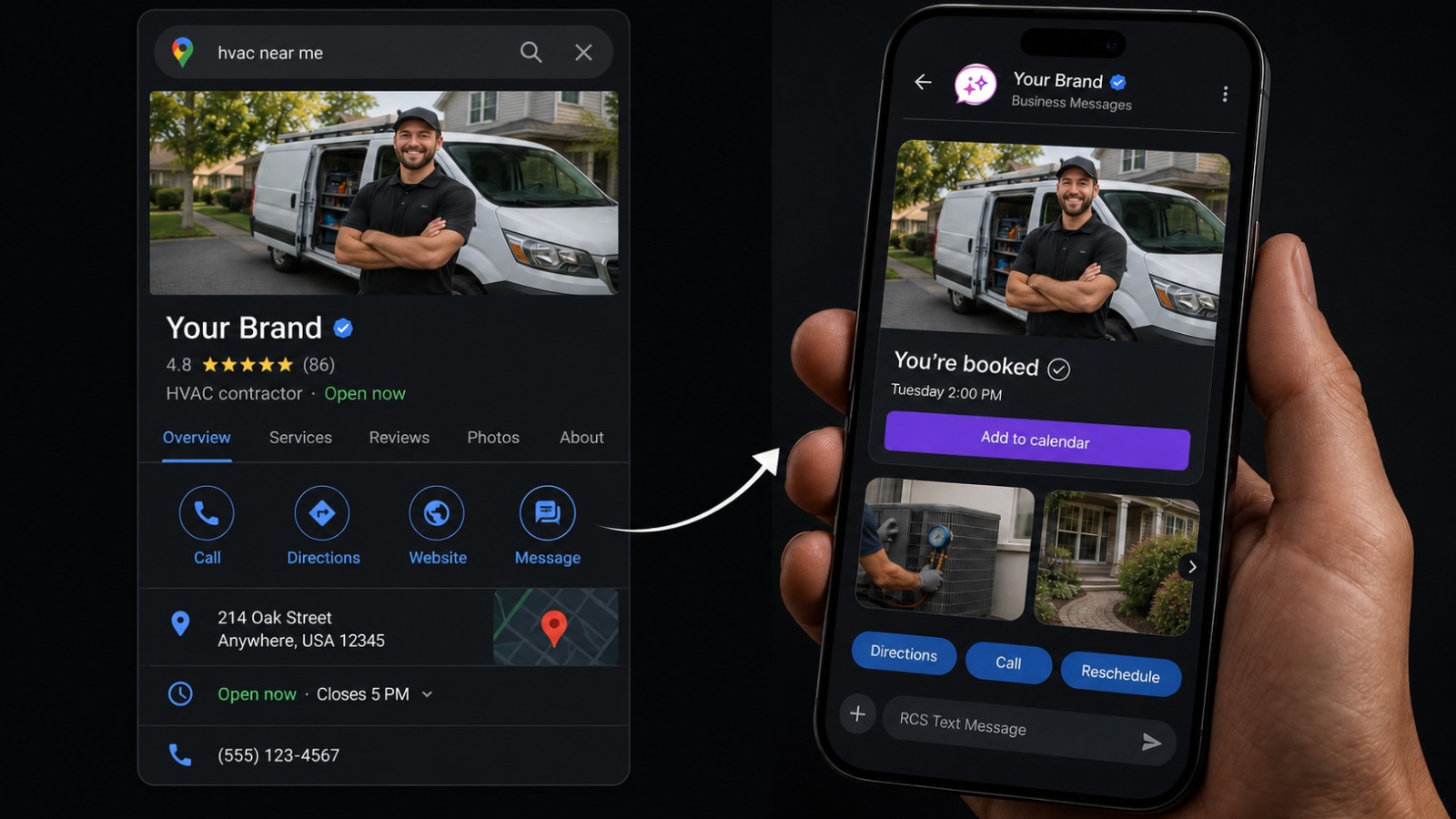
Three Google surfaces get treated as one product. They are not.
A message button on Search or Maps can open a user-initiated RCS for Business thread in the native Messages app. Google's public Chat field on a Business Profile still routes to WhatsApp or SMS. Click to RCS on that profile is a controlled proof of concept that runs through MessageOS, an Official Google RBM Partner. Mix those three up and you will spend a week flipping a Chat toggle that never becomes a verified sender.
The how-it-works sentence is stale
Google's developer how-it-works guide still says users cannot start a conversation with your agent. That sentence is leftover from the business-initiated model, where the agent sends first after a trigger. Later official pages document the other direction.
Click to Message is the teaching name for a tap that opens Messages. Google's language is user-initiated conversations. Both are real. The how-it-works page is not the last word on who can tap first.
Search and Maps buttons are Early Access, not a listing tweak
On 13 April 2026, Stephen Brough, Global GTM Head of RCS for Business, published Google's post on user-initiated conversations. Brands using RCS for Business can add a message button to Google Search and Maps listings. A tap starts a chat in the native messaging app. The thread stays in message history.
The surfaces named in that post are Message Ads on paid Search, Web Results on organic category or product search, SiteLinks on an exact-name business search, and Featured Snippets when someone looks up support. More search surfaces are coming. The same post invites brands to sign up for Early Access.
Treat those buttons as a documented product with an Early Access path. Do not treat them as a switch every Google Business Profile already has. Search to Conversation shows the motion. This post is the operator split: which door is RCS, which door is still SMS, and which door is a partner proof of concept.
Public Business Profile Chat is still WhatsApp or SMS
Google's published Chat steps for a claimed, verified listing attach WhatsApp or a number that receives texts. That is a contact method. It is not a verified logo, not a rich card, and not branded RCS.
We already wrote the listing version. Read Add Click to Message on Google Business Profile if you need those public steps. Do not paste a WhatsApp URL into Chat and expect a checkmark in Messages.
Click to RCS on a Business Profile is a controlled Google proof of concept through MessageOS. Evaluations are available. It is not a DIY SMS or WhatsApp how-to.
A third user start: sms deep links
Users can also start from an sms: URL in email, on a website, in an app, or in a QR code. Google's SMS deep links guide is the spec. The Click to RCS glossary is the operator page.
Success needs all three: Google Messages installed at the documented minimum version messages.android_20241029_00, RCS chats enabled, and the agent launched on that person's carrier. If those fail and the URL has a fallback number, the person is routed there. If those fail and there is no fallback, they see an error and a Messages Help Center link.
That minimum version path is documented for Google Messages. Do not assume the same client rule for iOS unless a primary source says so. Deep links cannot pre-fill suggested replies or suggested actions. Manual paste into a browser does not work. For a QR, Google recommends a short link in front of the agent URL.
What you owe the person who tapped
The Acceptable Use Policy for user-initiated traffic is specific. Respond only with communications relevant to the inquiry. Inform the user at the point of entry, the QR or the tap-to-chat button, of the type of content and interactions to expect before the conversation starts.
A Message chip that opens a promotional blast is a policy problem, not a growth hack. What RCS for Business is is the MessageOS explainer. The API still says RBM. Customer-facing copy should say RCS for Business.
Business RCS is not end-to-end encrypted, and it is not HIPAA. Do not put PHI in the thread. Do not put a lock icon on the sender as a trust signal. See healthcare for appointment reminders and a portal link, not PHI in-thread.
One agent, every door
RCS is live on all US carriers and on iOS and Android. That is channel availability. It is not a claim that every device will render a rich card. The phone still needs RCS on. The agent still has to be launched.
When the thread does open in native Messages, it can carry the power of an app with the reach of a text message: a verified sender, read receipts, delivery receipts, typing indicators, rich cards, and suggested actions. SMS does not have those primitives.
MessageOS can set up Search, Maps, ads, the Business Profile proof of concept, a QR, sms deep links, a missed-call text-back, a website share-row icon, and the rest of the entry points map. They land in one thread.
That is useful for legal intake, agencies that already buy the search, HVAC and home services dispatch, healthcare appointments, retail and live commerce, and any local business that already paid for the listing. Agencies can put the same agent behind the tap. Dental, restaurants, and auto are the same pattern. See RCS for dental, RCS for restaurants, and RCS for automotive. Live RCS is the product page for a launched agent.
Named brand experiences on the site are unofficial conceptual simulations. They are not customers. MessageOS.ai is not the overseas WhatsApp company. We do not run WhatsApp Chat for you.
What to do next
If your team is hunting for a Chat toggle on the profile, stop. That field will not grow a verified RCS thread.
If you want Search and Maps message buttons, the Business Profile proof of concept, sms deep links, and the rest of the doors on one launched agent, contact MessageOS or request a preview. An evaluation is available. Bring the brand, the surfaces you already pay for, and the outcome you want from the first tap: book, order, intake, or a support start.
We will tell you which doors are Early Access, which door is still WhatsApp or SMS, and which proof of concept we can run. Then we put the conversation behind the tap so the person who found you can finish the job in Messages.
- What Is RCS Business Messaging?RCS Business Messaging (RBM) is a messaging standard that replaces plain SMS with branded, verified, interactive conversations in the phone's native messaging app. A business is verified with carriers and platform providers, then sends and receives rich content: logo and brand name, rich cards, carousels, suggested replies, images, and real two-way dialogue. Availability depends on the recipient's carrier, device, and operating system, and messages fall back to SMS when RCS is unavailable.
- AI Search to Conversation: The New Path to a CustomerAI search changes the customer journey from query, click, browse, convert into query, answer, act. When an assistant answers in place, the website visit may never happen, so the practical goal is to be understandable to AI systems and to offer a next step that works without a website session. A messaging thread is that next step: it starts instantly, needs no account, and can carry the outcome to completion.
- Click to Message: Turning a Tap Into a ConversationClick to Message is an entry point that opens the phone's native messaging app with a conversation already addressed, and usually pre-filled, so the customer only has to press send. It can be placed on a website, a search result, an ad, a QR code, an email, a social profile, or a physical sign. It works because the customer stays in an app they already trust instead of loading a new page or filling in a form.
Primary sources worth reading
- Google Business Profile Help· Google
Official documentation for Business Profile features, including the messaging and call to action surfaces on local listings.
- RCS Business Messaging developer documentation· Google for Developers
Google's technical reference for RCS Business Messaging: agent registration, rich cards and carousels, suggested replies and actions, capability checks, and webhook events.
Sources and further learning
- Capture more customers with user-initiated conversations· article
Stephen Brough, 13 April 2026. Search and Maps message buttons, named surfaces, Early Access signup.
- Start a conversation from an SMS deep link· official documentation
sms: deep links from email, web, apps, or QR. Success, fallback, and Google Messages minimum version.
MessageOS Team
· MessageOS.aiMessageOS is the Conversation-to-Outcome Platform, helping brands turn Google Search, AI Search, and click-to-message intent into branded AI conversations that deliver measurable outcomes.