The Power of an App With the Reach of a Text
QuickBite shows the split. An app plus SMS is two jobs. One verified RCS thread in Messages is the power of an app with the reach of a text message.
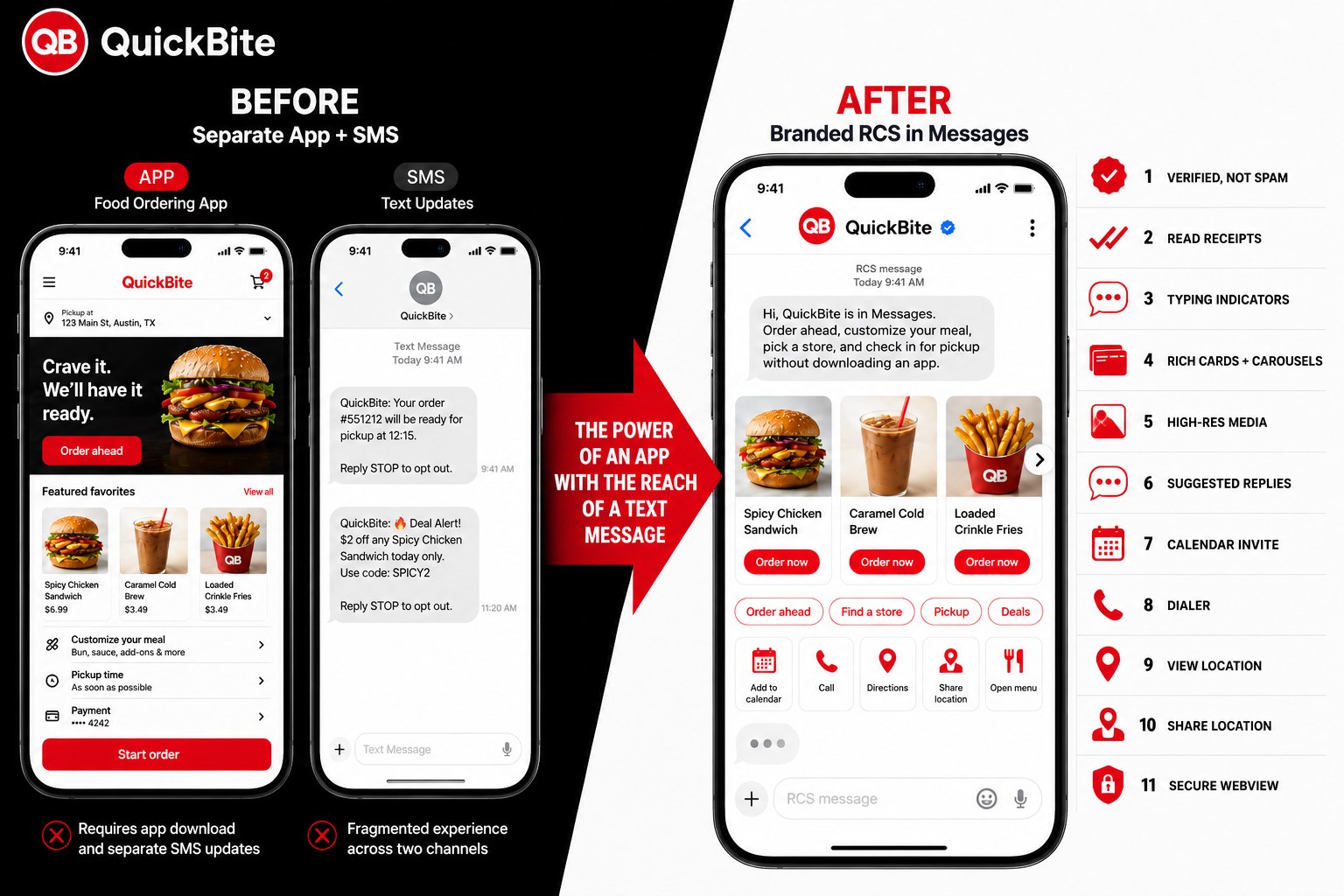
A branded app plus a separate SMS thread still splits one order across two jobs.
That is the before in the QuickBite walkthrough. Order ahead lives in an app the guest has to find, install, and keep. Status and a deal alert land later in a plain SMS with a STOP footer. Two inboxes. Two brands that do not look the same. Two places to lose the next tap.
The after is one verified QuickBite thread in native Messages. A carousel. Suggested actions. A composer that already reads RCS message. That is the power of an app with the reach of a text message. No download.
The split is the product problem
Restaurants are a clean example. A guest wants a spicy chicken sandwich, a cold drink, and a pickup window. The brand answers with an app store listing and a later text. The app can look like a store. The SMS cannot. So the brand ships both, and the guest now has homework.
The app asks for a download. It asks for a location, a cart, a payment method, and another icon on the home screen. The SMS arrives as an unknown number or a short code with a coupon and a STOP line. Nothing in that text can show the sandwich. Nothing can take the next order. The two channels do not share a thread.
That is not a guest problem. It is a stack problem. RCS versus SMS is the honest channel comparison, including where SMS still wins as fallback. The product mistake is treating the app as the store and the text as the receipt.
QuickBite puts both sides on one graphic so the split is obvious. Left: a branded app and a fragmented SMS. Right: one Messages thread that can finish the order.
What changes when the thread is RCS for Business
The official external name is RCS for Business. RBM is the API name and the support address. MessageOS talks as a partner. We are not Google, and we are not the carrier.
Google's RCS for Business overview is the brand page for a verified sender, rich media, suggested actions, and a web view inside the native messaging app. The send messages guide is the operator page for what that thread can actually carry: text, rich cards, carousels, high-res media, suggested replies, and suggested actions such as calendar, dialer, view location, share location, and a URL opened as a webview.
RCS is live on all US carriers and on iOS and Android. That is availability. It is not a customer claim, and it is not a promise that every device will render a rich card. The phone still needs RCS on. The agent still has to be launched on that network.
When the thread does open in native Messages, it can carry:
- A verified sender, not a spam-looking number
- Read receipts and delivery receipts
- Typing indicators
- Rich cards and carousels
- High-res media
- Suggested replies
- A calendar invite
- A dialer action
- View location
- Share location
- A secure webview
That last item is webview. The lock on the graphic is the webview control, not a claim that the business thread is end to end encrypted. Business RCS is point to point and scanned. It is not HIPAA. Do not put PHI in the thread.
Suggested actions in Google's send guide include opening a URL in a webview so a catalog, a cart, or a form can sit inside Messages. That is still a webview. It is not a lock on the sender, and it is not encryption of the business conversation.
Native Messages, not another app
The contrast is not rich versus plain. The contrast is one more app versus the inbox the guest already opens.
A download is a second product. WhatsApp is a second product too. MessageOS.ai is not a WhatsApp product, and it is not the overseas MessageOS that is. This thread opens in native Messages. No download. The guest does not leave the inbox they already trust with family texts.
Live RCS is the product page for a launched, verified agent in that inbox. Retail is the shopper version of the same motion. Live commerce is the browse and buy version. Restaurants are one example of the pattern. A local business that already paid for the visit should not send that visit into an app store listing.
Agencies can put the same agent behind the sites and campaigns they already run. The agencies page is the partner door.
One thread, every door
The thread is not the only job. The doors have to land in it.
MessageOS can set up Search, Maps, ads, a Google Business Profile proof of concept, a QR, sms deep links, a missed call text back, a website share-row icon, and the rest of the entry points map. They land in one thread.
Click to Message is the tap that opens Messages. Click-to-RCS on a Business Profile is a controlled proof of concept. It is not a public Chat toggle, and it is not a DIY listing field.
Do not stand up an app for the order, SMS for the update, a web form for the deal, and a missed-call voicemail for the store. That is the before. The after is one branded RCS for Business agent, launched, behind every door you already pay for.
Inside that thread a Branded AI Concierge can greet in the brand voice, show the sandwich as a card, take a suggested action, and pass the order into the system you already run. Capability Discovery is how it learns what you actually offer. Outcome Connectors hand the ticket to the POS or the pickup board. Live Business Mode is the difference between a canned reply and a thread that knows hours, pickup windows, and what is on the board today.
What to do next
If your brand still splits the store into an app and a text, look at the QuickBite graphic again. The guest already has Messages. Give them one verified thread.
Open MessageOS in Messages and see the public door. If you want that door on your own brand, contact us or get in touch. An evaluation is available. Bring the brand, the surfaces you already pay for, and the outcome you want from the first tap: order, pickup, or a return visit.
MessageOS.ai is the partner that stands up the agent and the entry points. The inbox is already on the phone. The power of an app with the reach of a text message does not need a download.
- RCS for Retail: How Brands Turn the Inbox Into a Storefront, a Loyalty Program, and a Service DeskRetail brands spend fortunes on email and SMS to fight for an inbox slot most shoppers ignore. RCS Business Messaging plus an AI agent gives retailers a verified, two-way, fully visual storefront inside the native messages app, where shoppers actually look.
- What Is RCS Business Messaging?RCS Business Messaging (RBM) is a messaging standard that replaces plain SMS with branded, verified, interactive conversations in the phone's native messaging app. A business is verified with carriers and platform providers, then sends and receives rich content: logo and brand name, rich cards, carousels, suggested replies, images, and real two-way dialogue. Availability depends on the recipient's carrier, device, and operating system, and messages fall back to SMS when RCS is unavailable.
- RCS vs SMS: What Actually Changes for a BusinessSMS is a universal, plain-text channel with no sender branding and a 160-character frame. RCS adds verified brand identity, rich cards, carousels, suggested replies, richer media, and true two-way conversation, but only where the carrier, device, and OS support it. Most brands run both: RCS where available, SMS as the automatic fallback.
Primary sources worth reading
- RCS Business Messaging developer documentation· Google for Developers
Google's technical reference for RCS Business Messaging: agent registration, rich cards and carousels, suggested replies and actions, capability checks, and webhook events.
- RCS for Business blog· Google
Google's official program blog for RCS Business Messaging, covering feature releases, brand case studies, and carrier rollout news.
Sources and further learning
- RCS for Business· product resource
Google's brand overview of verified senders, rich media, suggested actions, and web view in native Messages.
- Send messages· official documentation
Google developer guide for RCS for Business message types: text, rich cards, carousels, suggested replies, and suggested actions including webview.
MessageOS Team
· MessageOS.aiMessageOS is the Conversation-to-Outcome Platform, helping brands turn Google Search, AI Search, and click-to-message intent into branded AI conversations that deliver measurable outcomes.