Convert Your 10DLC or TFN Texts to Branded Text Messages
An unknown number and a short link look like a scam. Move your 10DLC or TFN texts to a verified RCS sender and convert more of the leads you already pay for.
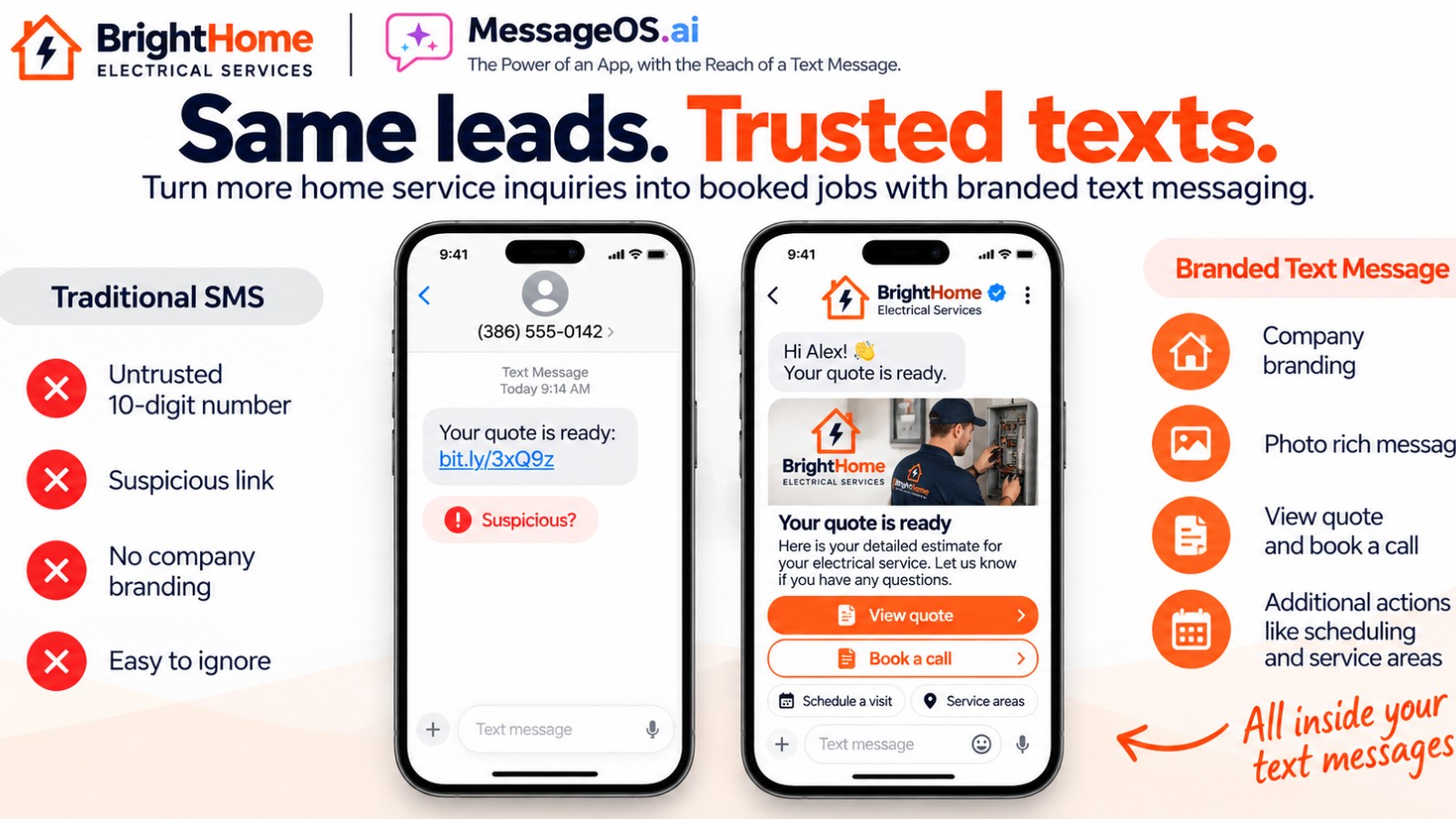
A lead fills out your form on Tuesday. Two minutes later their phone buzzes with a text from a 10-digit number they have never seen, ending in a shortened link. They hesitate, think about every package delivery scam they have deleted this year, and swipe it away. You paid for that lead. The message that was supposed to convert it looked exactly like fraud.
If your business texts from a long code (10DLC) or a TFN (an 800 number), this is the quiet tax on every campaign. The number is registered, the content is compliant, and it still reads as a stranger. The fix is not better copy. It is a sender people recognize.
Why a number and a link look like a scam
Plain SMS has no identity layer. The header shows digits, the body shows text, and any link is just a string of characters. Scammers use the same format, so careful customers have learned to distrust all of it. Carrier rules push in the same direction. The CTIA messaging principles exist because unwanted and deceptive texts are a real problem, and registration helps carriers filter traffic. It does not help your customer know the message is really from you.
That gap is where leads leak. Not because your offer is weak, but because the first impression is a question mark.
What a verified RCS sender shows instead
RCS for Business puts your brand in the native Messages app. After brand verification and carrier launch, the thread header shows your business name, your logo, and a verified checkmark instead of a phone number. Google documents the agent model and verification flow in its RCS for Business developer docs.
Inside the thread you get more than text:
- Rich cards with an image, a title, and a clear description
- Suggested replies and action buttons instead of mystery links
- Buttons that open a map, a calendar, a call, or a page you name, so the customer sees where a tap goes
Picture a made-up home services company, BrightHome. Today it texts new leads from an 800 number with a short link to book an estimate. On RCS, the same lead sees "BrightHome" with the logo and check, a card showing the estimate offer, and buttons for "Book a time" and "Call us". Same lead, same offer, a sender they can trust at a glance.
RCS is live on all US carriers and on iOS and Android. That is channel availability, not a promise that every device renders every card. For the full comparison, see RCS vs SMS.
Keep your number. It becomes your fallback
You do not throw away your 10DLC or TFN registration. When a phone cannot receive RCS, the message needs a plain SMS path, and your existing registered number is that path. Fallback is not automatic just because RCS exists. It is handled by your messaging partner, and it only works if the SMS sender stays registered and healthy. We cover the partner side in launching RCS through a partner.
So the conversion is additive. Your number keeps working for SMS. Your brand takes over everywhere RCS is available.
How the conversion works
We guide each step so your team is not reverse engineering requirements:
- Brand verification. Legal name, website, logo, contact, and proof you own the brand. This is the step most launches stall on, and it is where our experience matters most.
- Agent setup. Display name, logo, colors, description, and the contact details shown in the thread.
- Use case. Pick the right use case for what you actually send, since it shapes review and what the agent can do.
- Launch. Google reviews the agent and carriers approve the launch. MessageOS handles the submissions and the back and forth.
- Entry points. Point your forms, ads, website, and Click to Message buttons at the new thread. See every entry point we support.
Google and the carriers do the approving. We run the process. In our recent experience, launches have been taking about three weeks from a complete submission. That is what we are seeing, and timing depends on your brand details and reviewer queues.
Why start before the holidays
Carriers and messaging partners often slow down or pause changes around the holiday season while traffic peaks. Short code programs, for example, routinely see published holiday certification blackouts. If you want a branded sender working for your end of year promotions, the safer move is to get verification in motion now rather than in December.
Is your business a fit?
- You already text leads or customers from a 10DLC or TFN number
- You pay for those leads through ads, search, or referrals
- Your messages include links, offers, or booking requests
- You have a real brand with a website and a logo
- You want customers to recognize you before they read a word
If most of those are true, the upgrade is likely worth it. Industries like home services and local businesses feel it fastest because every lead is expensive.
What to do next
Tell us what you send today, from which numbers, and where your leads come from. We will map your path from 10DLC or TFN to a verified brand and get brand verification started. Contact the MessageOS team and let our experience guide the launch.
- RCS vs SMS: What Actually Changes for a BusinessSMS is a universal, plain-text channel with no sender branding and a 160-character frame. RCS adds verified brand identity, rich cards, carousels, suggested replies, richer media, and true two-way conversation, but only where the carrier, device, and OS support it. Most brands run both: RCS where available, SMS as the automatic fallback.
- What Is RCS Business Messaging?RCS Business Messaging (RBM) is a messaging standard that replaces plain SMS with branded, verified, interactive conversations in the phone's native messaging app. A business is verified with carriers and platform providers, then sends and receives rich content: logo and brand name, rich cards, carousels, suggested replies, images, and real two-way dialogue. Availability depends on the recipient's carrier, device, and operating system, and messages fall back to SMS when RCS is unavailable.
- Click to Message: Turning a Tap Into a ConversationClick to Message is an entry point that opens the phone's native messaging app with a conversation already addressed, and usually pre-filled, so the customer only has to press send. It can be placed on a website, a search result, an ad, a QR code, an email, a social profile, or a physical sign. It works because the customer stays in an app they already trust instead of loading a new page or filling in a form.
Primary sources worth reading
- RCS for Business FAQ· Google
Google's official answers on RCS availability, brand verification, device and carrier support, and how RCS differs from SMS.
- RCS for Business blog· Google
Google's official program blog for RCS Business Messaging, covering feature releases, brand case studies, and carrier rollout news.
Sources and further learning
- RCS for Business· official documentation
- CTIA Messaging Principles and Best Practices· guide
MessageOS Team
· MessageOS.aiMessageOS is the Conversation-to-Outcome Platform, helping brands turn Google Search, AI Search, and click-to-message intent into branded AI conversations that deliver measurable outcomes.